
You are using an out of date browser. It may not display this or other websites correctly.
You should upgrade or use an alternative browser.
You should upgrade or use an alternative browser.
access to audit logs
- Thread starter maxilee
- Start date

Hi,
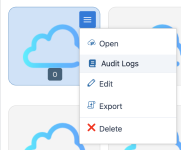
You can access all the audit logs by means of this icon in the after login screen:

For the audit logs of a concrete FWCloud:
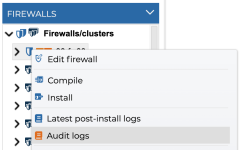
And for the audit logs for a firewall or cluster:
Greetings.
You can access all the audit logs by means of this icon in the after login screen:
For the audit logs of a concrete FWCloud:
And for the audit logs for a firewall or cluster:
Greetings.
Ok, sorry me.
You can see them in the fwcloud-api logs in the directory: /opt/fwcloud/api/logs
You can see them in the fwcloud-api logs in the directory: /opt/fwcloud/api/logs
I'v already checked these logs.
but they doesn't contain audit logs which I can see via web UI.
in web UI I can see which user made anych changes, installed firewall etc ...
maybe I'v not enabled something.
I know that audit logs exists in database
MariaDB [fwcloud]> select * from audit_logs;
[cut]
Code:
-rw-r--r--.  1 fwcloud fwcloud 46178478 Jul 16 15:55 app.log
-rw-r--r--.  1 fwcloud fwcloud  8895257 Jul 16 15:52 http.log
-rw-r--r--.  1 fwcloud fwcloud        0 Nov  4  2024 query.log
but they doesn't contain audit logs which I can see via web UI.
in web UI I can see which user made anych changes, installed firewall etc ...
maybe I'v not enabled something.
I know that audit logs exists in database
MariaDB [fwcloud]> select * from audit_logs;
[cut]
I'm sorry but at this moment such logs are only available in the fwcloud-ui or in the database.
ok. I understand.
maybe this will be usefull for someone.
I'll describe my setup.
I've created new table in DB audit_logs_queue and trigger which copy new records from audit_logs ( in my table I've disable autoincremental on ID filed ).
then I've write python script which fetch records from table audit_logs_queue and send then to syslog , and if sending was successfull - scripts remove record from DB.
work perfect and I've not modified any part of fwclodu
maybe this will be usefull for someone.
I'll describe my setup.
I've created new table in DB audit_logs_queue and trigger which copy new records from audit_logs ( in my table I've disable autoincremental on ID filed ).
then I've write python script which fetch records from table audit_logs_queue and send then to syslog , and if sending was successfull - scripts remove record from DB.
work perfect and I've not modified any part of fwclodu
Hi,
Great work!
We will have in mind for a future release include the option to send audit logs to syslog.
Great work!
We will have in mind for a future release include the option to send audit logs to syslog.